Rounding Method

Introduction
Purpose
This documentation is for any commerce solutions managers who are willing to know how to correctly apply rounding when reporting sales/returns data through poslog format for Decathlon.
This is applicable for any sales/returns made from POS or e-commerce solutions and whatever the country.
Rounding definition
Rounding means making a number simpler but keeping it close to its real value. The result is less accurate, but easier to use.
Usually, last digit ending by 0, 1, 2, 3 and 4 are rounded down to nearest value and last digit ending by 5, 6, 7, 8 and 9 are rounded up.
Rouding to nearest ten number.
40, 41, 42, 43 and 44 are rounded to 40. 45, 46, 47, 48 and 49 are rounded to 50.
Rouding to nearest 2 decimal number.
0.000, 0.001, 0.002, 0.003 and 0.004 are rounded to 0.00. 0.005, 0.006, 0.007, 0.008 and 0.009 are rounded to 0.01.
Rounding issue
Rounding independant numbers is OK but rounding numbers with a relation can lead to issues. Indeed, as rounding means losing precision, we can easily break the initial relation between those numbers when applying rounding.
Rounding sum of numbers compared to sum of rounded numbers
4.99 + 4.99 = 9.98
4.99 can be rounded to 5 and 9.98 can be rounded to 10.
After rounding, the relation between those numbers could still be true because, 5 + 5 = 10.
3.333333 + 3.333333 + 3.333333 = 9.999999
3.333333 can be rounded to 3.33 and 9.999999 can be rounded to 10.00
After rounding, the relation between those numbers could no longer be true because, 3.33 + 3.33 + 3.33 = 9.99 ≠ 10.00.
Indeed, the sum of rounded values will not always match the rounded sum of these detailed values.
Why proper rounding is so important ?
In retail, the main benefits of proper rounding is to comply with fiscal and accounting requirements. Proper rounding at item level and transaction level greatly reduce manual operations on data to enforce these compliances.
Especially in commerce solutions (POS or Ecommerce website), we report in each individual transaction, a list of items sold (or returned) and a list of payment methods (or refund methods).
A basic requirement for commerce solution is to ensure the balance between what needs to be paid for and what is paid.
This means, the total sum of item prices should match the total to be paid which should also match the total amount paid by the customer.
It is even more important because we have to record these amounts in accounting and discrepencies are not welcome in booking entries. Even one cent difference between what was paid and what was sold is not tolerated and these amounts should perfectly match.
Example of receipt :
Item 1 (10.00 EUR)  x 1        10.00 EUR
Item 2 (20.00 EUR)  x 1        20.00 EUR
Item 3 (30.00 EUR)  x 1        30.00 EUR
----------------------------------------
Total                          60.00 EUR
----------------------------------------
Creditcard                     60.00 EUR
Sum Items (10.00 + 20.00 + 30.00) = Total to be paid (60.00) = Total paid (60.00)
The balance is quite easy to guarantee as long as there’s no rounding applied.
Usually, another important information commerce solutions have to report in a transaction are the taxes applied on the receipt / bill.
Example of receipt :
Item 1 (4.99 EUR)  x 1          4.99 EUR
Item 2 (4.99 EUR)  x 1          4.99 EUR
Item 3 (4.99 EUR)  x 2          9.98 EUR
----------------------------------------
Total                          19.96 EUR
----------------------------------------
Rate  Tax incl.    Tax         Tax excl.
20%   19.96 EUR    3.33 EUR    16.63 EUR
----------------------------------------
Creditcard                     19.96 EUR
Sum Items (4.99 + 4.99 + 9.98) = Total to be paid (19.96) = Total paid (19.96)
Total tax + Total tax excluded (3.33 + 16.63) = Total tax included (19.96)
The balance is OK though rounding were applied.
This is how the amounts regarding tax were calculated and rounded :
Tax rate = 20% Total tax included = 19.96 Total tax excluded = 19.96 x 1/(1+20%) = 16.63333333 ~ 16.63 Total tax = Total tax included - Total tax excluded = 19.96 - 16.63333333 = 19.96 - 16.63 = 3.33
It could be tempting to do this : 19.96 - 16.63333333 = 3.326666667 ~ 3.33.
In that case, it will be the exact same result but this is not the proper way to do because of potential rounding issue it could lead to.
Please note, the tax amount should be calculated based on the other total including and excluding tax and it should not be calculated and rounded independantly. This is a way to always ensure the rule : Total tax included = Total tax excluded + Total tax.
Please note, it’s also possible to comply with this rule by calculating first the tax amount based on the total including tax, apply the rounding and then to get the total excluding tax.
To make the point, let’s keep the same tax rate of 20% and let’s take a total including tax of 19.95.
Tax rate = 20% Total tax included = 19.95 Total tax excluded = 19.95 x 1/(1+20%) = 16.625 ~ 16.63 Total tax = Total tax included - Total tax excluded = 19.95 - 16.625 = 19.95 - 16.63 = 3.32
It could be tempting to do this : 19.95 - 16.625 = 3.325 ~ 3.33 but if we do so, then we won’t comply with this rule anymore : Total tax included = Total tax excluded + Total tax.
Indeed, 16.63 + 3.33 = 19.96 ≠ 19.95.
This is very important to note when booking entries in accounting we usally report the total amount paid and the total amount excluded tax and the tax amount and the following rule should perfectly match : Total paid = Total tax excluded + Total tax.
Therefore, any mistake when applying rounding would lead to discrepencies in accounting.
Largest remainder method explained
Introduction
Let’s get back to this situation :
3.333333 + 3.333333 + 3.333333 = 9.999999
Independantly, 3.333333 can be rounded to 3.33 and 9.999999 can be rounded to 10.00 but then as we’ve seen previously, after rounding, the relation between those numbers is no longer true because, 3.33 + 3.33 + 3.33 = 9.99 ≠ 10.00.
How can we ensure the sum of rounded values will always match the rounded sum of these detailed values ?
Here come the Largest Remainder method to the rescue.
With this method, 9.999999 is rounded to 10.00 first and then each 3.333333 value is rounded in a way to always ensure the sum of the rounded values are matching with 10.00.
3.333333 + 3.333333 + 3.333333 = 9.999999
Is rounded like this :
3.34 + 3.33 + 3.33 = 10.00
The relation between the sum of rounded values is still equal to the rounded total.
Origin
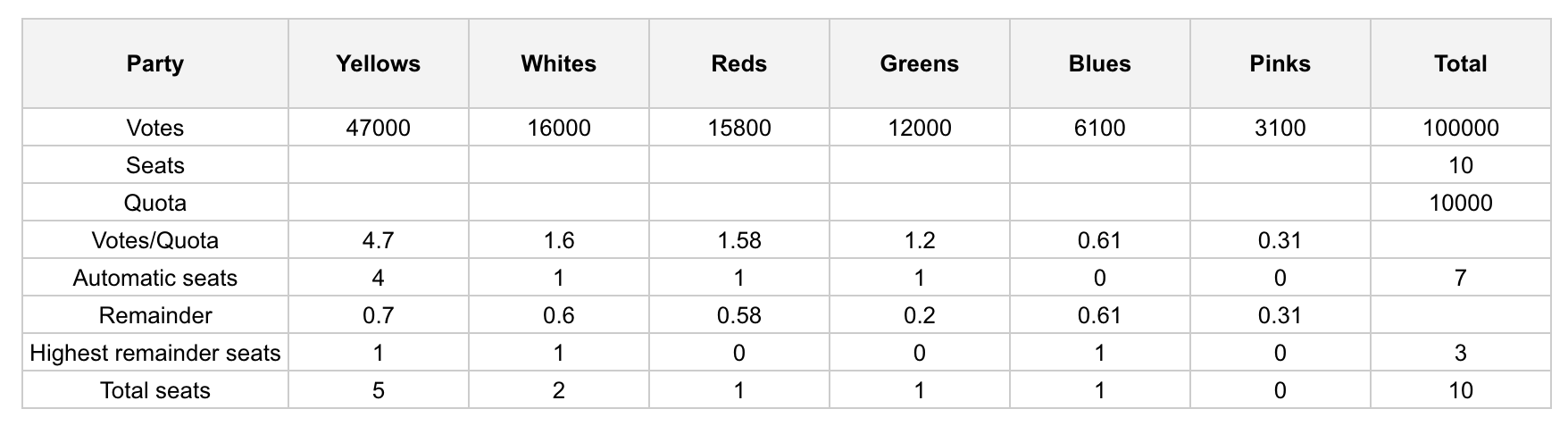
The largest remainder method is initially one way of allocating seats proportionally for representative assemblies with party list voting systems.
The largest remainder method requires the numbers of votes for each party to be divided by a quota representing the number of votes required for a seat (i.e. usually the total number of votes cast divided by the number of seats, or some similar formula). The result for each party will usually consist of an integer part plus a fractional remainder. Each party is first allocated a number of seats equal to their integer. This will generally leave some seats unallocated: the parties are then ranked on the basis of the fractional remainders, and the parties with the largest remainders are each allocated one additional seat until all the seats have been allocated. This gives the method its name.
Link to examples : https://docs.google.com/spreadsheets/d/1hMS6cZMMyk9u4amBj8hAUIS4M81C38D2VsTr7hRcmzM/edit#gid=0
Example :
Example with same remainders
Let’s see how does it works with our initial example :
3.333333 + 3.333333 + 3.333333 = 9.999999
which is rounded with this method like this :
3.34 + 3.33 + 3.33 = 10.00
First, we get the total 9.999999 to be rounded to 10.00. After, we truncate each individual values 3.333333 to 3.33 and we compare the sum of the truncated values 9.99 to the rounded total 10.00.
In this case, it means there is 0.01 missing for the truncated values to have the equation balanced after rounding. Therefore, we check the largest remainder to add 0.01 to its related truncated value.
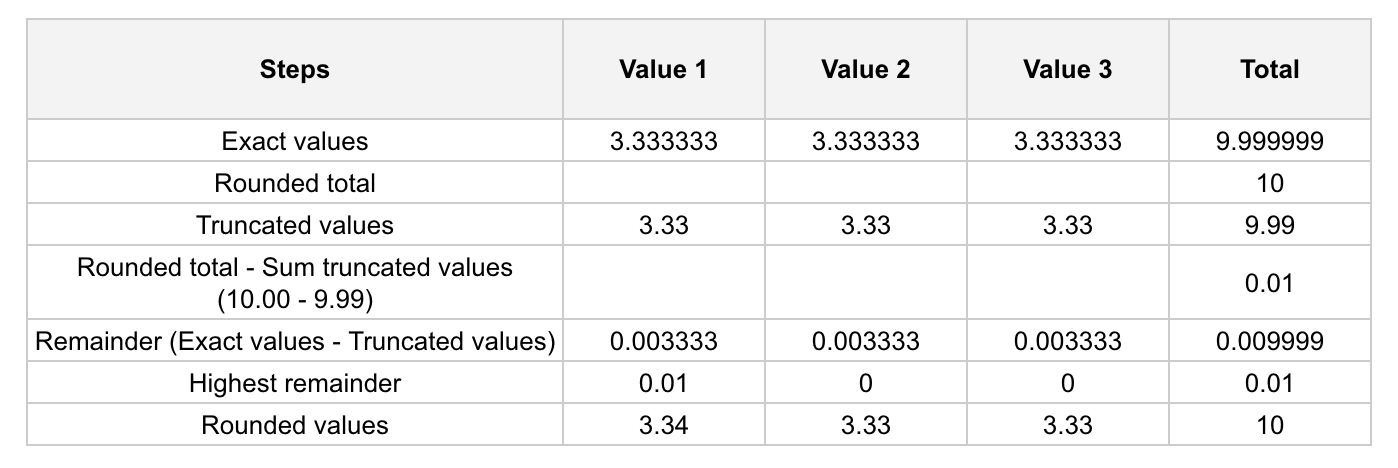
With all items with same remainders, usually the first ones get the additional cent when needed.
Let’s take another example :
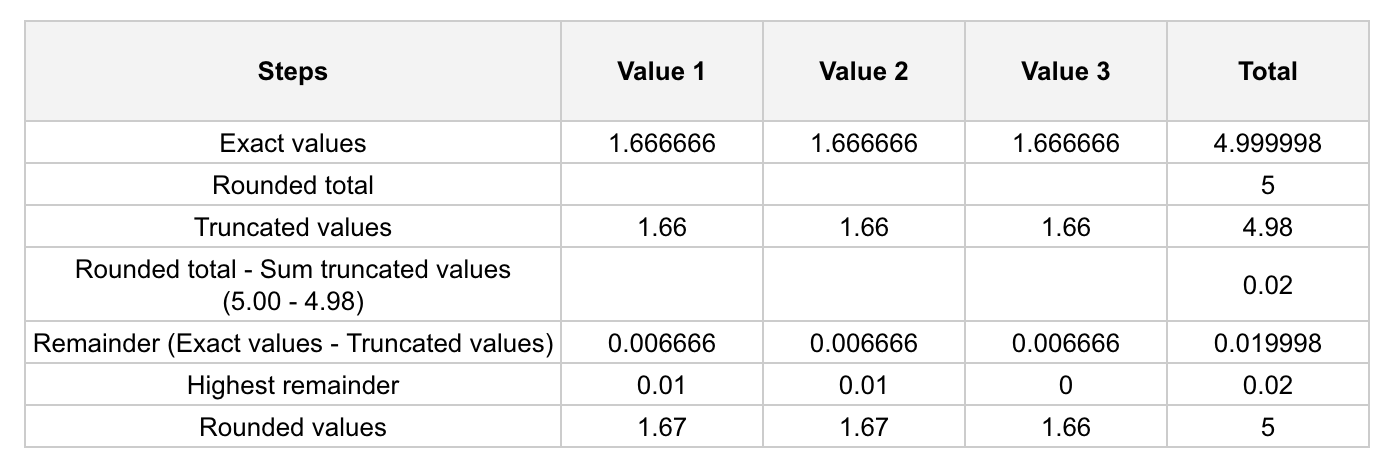
1.666666 + 1.666666 + 1.666666 = 4.999998
which is rounded with this method like this :
1.67 + 1.67 + 1.66 = 5.00
First, we get the total 4.999998 to be rounded to 5.00. After, we truncate each individual values 1.666666 to 1.66 and we compare the sum of the truncated values 4.98 to the rounded total 5.00.
In this case, it means there is 0.02 missing for the truncated values to have the equation balanced after rounding. Therefore, we check the 2 largest remainders to add 0.01 to its related truncated value.
Example with different remainders
Let’s see what happen with another example with different remainders.
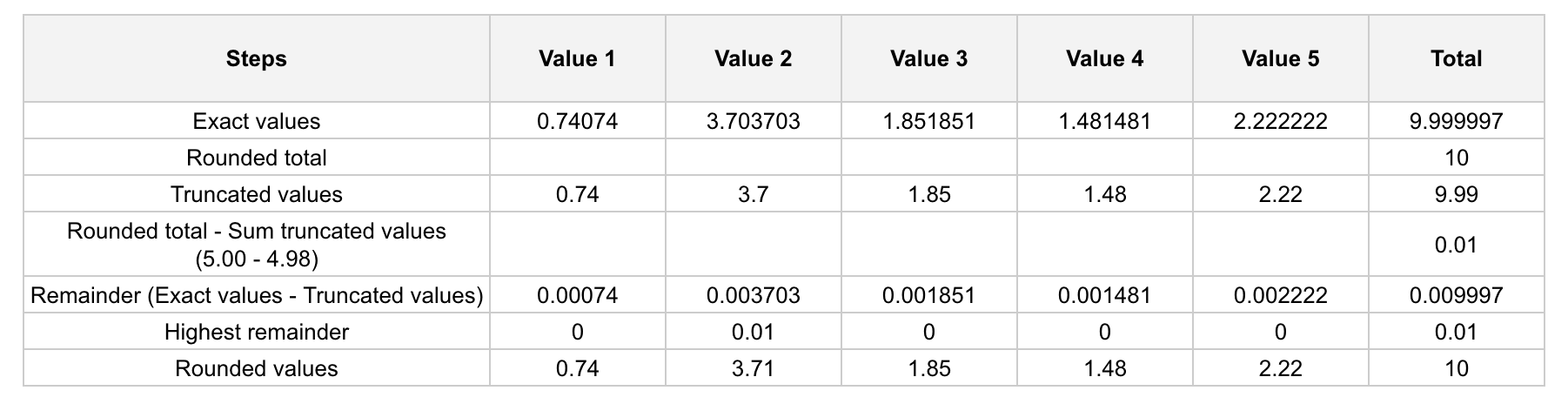
0.740740 + 3.703703 + 1.851851 + 1.481481 + 2.222222 = 9.999997
which is rounded with this method like this :
0.74 + 3.71 + 1.85 + 1.48 + 2.22 = 10.00
First, we get the total 9.999997 to be rounded to 10.00. After, we truncate each individual values 0.740740 + 3.703703 + 1.851851 + 1.481481 + 2.222222 to 0.74 + 3.70 + 1.85 + 1.48 + 2.22 and we compare the sum of the truncated values 9.99 to the rounded total 10.00.
In this case, it means there is 0.01 missing for the truncated values to have the equation balanced after rounding. Therefore, we check the largest remainder to add 0.01 to its related truncated value.